Use LOG4JS for Nodejs Logging
LOG4j is a well known logging framework used in Java. Coming with the same logging style with LOG4J, LOG4JS is easy for those who have Java experience with LOG4J to get started with.
1 Default Console Output
When we use express framework and start a nodejs app, console will output some message like
“GET /xxx…/xxx 200 30ms”.
We can hard coding with console.log() function to output some message as below:
console.log("This is an index page!");
The output in the console are good enough in dev environment, but not for production. In production it is more likely that you want save those output into a file and debug with leveling. Express framework does not provide log functionality, so we introduce log4js package to accomplish that.
2 Install Log4js
$ npm install log4js
3 Configuration in app.js
1
2
3
4
5
6
7
8
9
10
11
12
13
14
15
16
17
18
19
20
21
     var log4js = require('log4js');
     log4js.configure({
       appenders: [
         { type: 'console' }, // console output
         {
           type: 'file', // file output
           filename: 'logs/access.log',
           maxLogSize: 1024,
           backups:3,
           category: 'normal'
         }
       ]
     });

     var logger = log4js.getLogger('normal');
     logger.setLevel('INFO');
     ...
     //app.use(...)
     //app.use(...)
     app.use(log4js.connectLogger(logger, {level:log4js.levels.INFO}));
In this example, we defined two types of output in “appenders”: one for the console, another for the file. There are more we can use to output logs : DateFile,
SMTP, levelFilter and other appender.
“filename” specifies the path of the log file, when the file exceeds the maxLogSize, a new file will be generated.
In log4js.getLogger(‘normal’); ‘normal’ here is a category. You can get a logger instance by define different categories according the node package, therefore you know the source of a log.
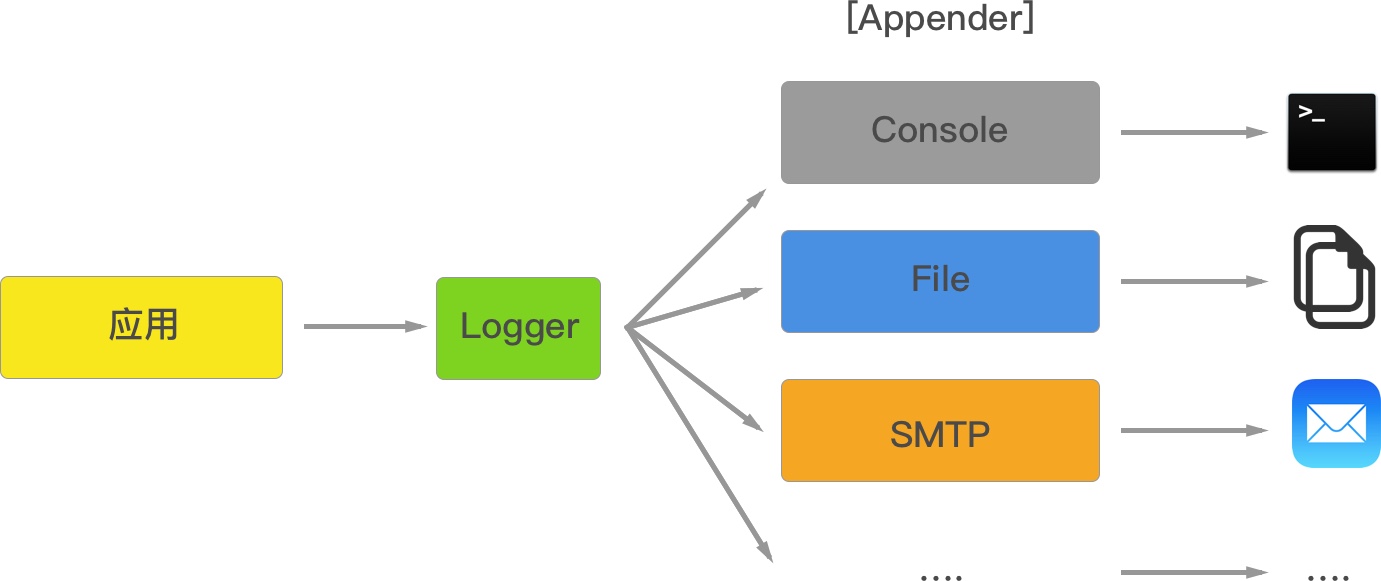
To be aware, ”logs” folder has to be created manually.
9 levels of log:
{
  ALL: new Level(Number.MIN_VALUE, "ALL"),
  TRACE: new Level(5000, "TRACE"),
  DEBUG: new Level(10000, "DEBUG"),
  INFO: new Level(20000, "INFO"),
  WARN: new Level(30000, "WARN"),
  ERROR: new Level(40000, "ERROR"),
  FATAL: new Level(50000, "FATAL"),
  MARK: new Level(9007199254740992, "MARK"), // 2^53
  OFF: new Level(Number.MAX_VALUE, "OFF")
} All and OFF are not used in applications, others are functions we can invoke.
In production, we probebly care only about info and error and fatal level message. When the output level is set to INFO, trace and debug message will not be output, therefore reduces the amount of size for records.
4 Configure for projects
In previous section, we go through integration log4js with express. Normally we want to configure our log according to our project specific requirements other than use the default configuration.
1. Replace console.log()
add replaceConsole, let all messages go into a log file.
vi app.js
var log4js = require('log4js');
log4js.configure({
  appenders: [
    { type: 'console' },{
      type: 'file',
      filename: 'logs/access.log',
      maxLogSize: 1024,
      backups:4,
      category: 'normal'
    }
  ],
  replaceConsole: true  //this sends console output into the log output file
});
2. Format
app.use(log4js.connectLogger(logger, {level: level:log4js.levels.INFO, format:':method :url'})); This makes the output short and concise.
3. Set level to auto
Log level rules:
http responses 3xx, level = WARN http responses 4xx & 5xx, level = ERROR else, level = INFO
set level to auto
app.use(log4js.connectLogger(logger, {level: ‘auto’, format:’:method :url’}));
4. Define a logger.js as an API
In previous example, all configuration is in the app.js, which makes it unavailable for routes. Now let us export them out and make it a separated file to for other js file.
Code of logger.js
  var log4js = require("log4js");
  log4js.configure({
      appenders:[
          {
              type:"console"// for console output
          },
          {
              type:"file",// for file output
              filename:'logs/access.log',
              maxLogSize:1024,
              backups:3,
              category:'normal'
          }
      ],
      replaceConsole:true
  });
  exports.logger = function(category,level){
      var logger = log4js.getLogger(category);
      logger.setLevel(level);
      return logger;
  }

  exports.connectLogger = function(logger,options){
      return log4js.connectLogger(logger,options);
  }
Use logger.js in index.js
var express = require('express');
var router = express.Router();

var log4js = require('../logger')
var logger = log4js.logger('normal','INFO');

/* GET home page. */
router.get('/', function(req, res, next) {
  console.log("This is an index page!");
  logger.info("This is an index page! -- log4js");
  logger.trace("Entering cheese testing");
  logger.debug("Got cheese.");
  logger.warn("Cheese is quite smelly.");
  logger.error("Cheese is too ripe!");
  logger.fatal("Cheese was breeding ground for listeria.");

  res.render('index', { title: 'Express' });
});
module.exports = router;
So far we are all set for logging in a production environment.
Leave a Comment